Category: windows 10
-
How to Stop Microsoft from Collecting Your Data on Windows 10
Many Windows 10 users are concerned about their privacy as Microsoft collects diagnostic and usage data to improve its services. While this data collection can enhance user experience, it may also feel intrusive. Fortunately, you can control what information Microsoft collects and prevent personalized tracking. To begin, press the Windows key + I on your…
Written by
·
-
Stop These Apps Now to Instantly Boost Your Windows 10 Speed
If your Windows 10 computer feels slow, freezes, or takes too long to start, background apps and startup programs are often the main cause. These hidden processes drain RAM, CPU power, and battery life without you realizing it. The good news? You can instantly boost your Windows 10 performance by disabling unnecessary background apps and…
Written by
·
-

The Easiest Way to Open a Folder in CMD on Windows 10
Opening a folder directly in Command Prompt (CMD) on Windows 10 can save you time and effort, especially if you frequently use command-line tools for file management or development tasks. Many users waste time typing long directory paths manually but there’s a much faster and easier method built right into Windows Explorer. First, open File…
Written by
·
-

Fix “You’re Sharing Your Connection Over the 5GHz” on Windows 10
If you’ve seen the message “You’re sharing your connection over the 5GHz band” when using Mobile Hotspot on Windows 10, you’re not alone. This issue often prevents older devices from connecting to your Wi-Fi hotspot because many phones and laptops only support the 2.4GHz band. Fortunately, switching your network band from 5GHz to 2.4GHz is…
Written by
·
-
How to Turn On and Use the Magnifier Tool in Windows 10
If you ever find yourself struggling to read small text or view details on your computer screen, Windows 10 includes a built-in Magnifier tool designed to make everything easier to see. This accessibility feature enlarges parts of the screen, helping users with visual difficulties or anyone who needs a closer look. In this guide, you’ll…
Written by
·
-
How to Find All Installed Apps in Windows 10
If you’ve ever wanted to see all the apps and programs installed on your Windows 10 computer, you’re not alone. Many users want to organize, uninstall, or simply check what software is currently available. Luckily, Windows 10 includes a hidden shortcut that shows you every installed app in one place without the need for any…
Written by
·
-
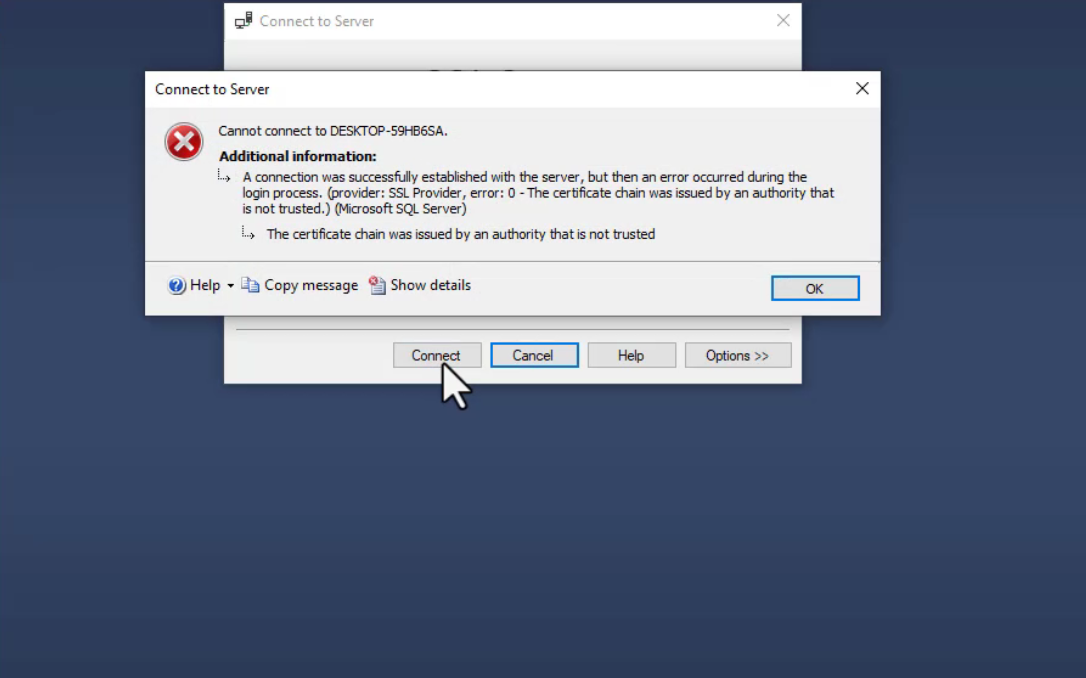
How to Fix “The Certificate Chain Was Issued by an Authority That Is Not Trusted” in SQL Server
If you encounter the error “The certificate chain was issued by an authority that is not trusted” in SQL Server, it usually means your connection does not trust the server’s SSL certificate. This quick guide shows you how to resolve it step by step. Open SQL Server Management Studio (SSMS). Click on File in the…
Written by
·